
Contents
Guideline Planes
Guidelines Planes allow polygon vertexes to be aligned accurately. You can create a guideline by clicking the mouse over the darkened border region of any Orthographic View window. If the darkened region is not visible then you will need to set guidelines visible using the Display window (short-cut d to open the Display window).
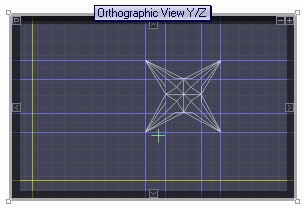 Guidelines are technically a plane defined by a single axis position, such as x=5 or z=-3. This is in contrast to the Locator which is a single point defined for example as (x,y,z) = (1,2,3).
Guidelines can also be created using the Locator window. Open the Locator window by typing Shift+L and create the guideline at any of the Locator axis positions. For example, to create a guideline at x=5, enter the value 5 in the X input box and click New X Guideline.
Guildelines can be moved by clicking the mouse over them and dragging them. They are deleted by dragging them out of any Orthogonal View window.

Locator