
Contents
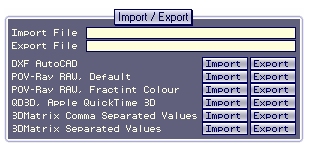
Import / Export Window (short-cut 'e')
This documents describes the various file formats that 3D Matrix can deal
with, in addition to the main XML file format that 3D Matrix uses to save
and restore all object information.
Index
1. DXF AutoCAD Format
2. POV-Ray RAW Triangle, Default Format
3. POV-Ray RAW Triangle, Fractint Colour
4. QD3D, Apple QuickTime 3D Meta File Format
5. 3DMatrix Alpha CSV, Comma Separated Values
6. 3DMatrix Alpha CTV, Tab Separated Values
1. DXF AutoCAD Format
DXF is possibly the most widespread CAD format in use on small
computer systems. It was developed primarily by the AutoCAD developers
and has thus received it popularity mainly from the high number of
AutoCAD stations. Most CAD systems can export and most also import
DXF.
The DXF import routine used by 3DMatrix imports three-vertex polygons as
well as four-vertex polygons relating to the keywords POLYLINE and
3DFACE. Other DXF object types are ignored. Four-vertex polygons are handled
by either producing two three-vertex polygons or in the case that two vertexes
are overlayed, ignoring the repeated vertex. Color information is ignored.
3DMatrix will eventually support more features of the DXF definition.
The DXF export routine builds a common DXF file using the file
export_header.dxf supplied with 3DMatrix and adds a new 3DFACE object
corresponding to each 3DMatrix polygon.
2. POV-Ray RAW Triangle Format
This format is often used for feeding triangular facet geometry
through the POV utility RAW2POV. The default triangle format uses only
nine numbers per triangle and does not include color information. The
numbers can be separated with single spaces or tabs.
Ax Ay Az Bx By Bz Cx Cy Cz
Example with two triangles:
-------start of file-----------
-1.3 -2.2 -3.0 4.9 -2.2 -1.0 1.6 -6.3 -7.5
-2.4 -3.0 3.1 -2.2 -2.0 1.6 -5.2 -6.3 -7.5
-------start of file-----------
3. POV-Ray RAW Triangle, Fractint Color
If the RAW2POV application is fed the -fc option then it will use the
following twelve numbers per triangle format that includes color. The
numbers can be separated with single spaces or tabs. The R G B values
are between 0 and 1.
R G B Ax Ay Az Bx By Bz Cx Cy Cz
Example with two triangles:
----------start of file-----------
0.4 0.3 0.2 5.0 -5.3 -2.1 3.4 1.2 4.2 3.3 -2.1 3.0
0.4 0.3 0.2 4.0 -2.3 -1.1 2.4 2.2 5.2 4.3 -3.1 1.0
----------start of file-----------
4. QD3D, Apple QuickTime 3D Meta File Format
The 3DMatrix QD3D export routine creates a paragraph of text for each
triangle as follows:
----------start of file-----------
Container (
Triangle (
-1 -0.5 -0.25
0 0 0
-0.5 1.5 0.45
)
Container (
AttributeSet ( )
DiffuseColor ( 0.8 0.5 0.2 )
)
)
Container (
Triangle (
-5 -1.5 -3.25
2 1 1
-1.5 0.5 5.423
)
Container (
AttributeSet ( )
DiffuseColor ( 0.8 0.5 0.2 )
)
)
-----------end of file----------
The 3DMatrix QD3D import routine strips away carriage returns, ')' and
'(' characters, searches for the word 'Triangle' and collects the next
9 space-separated words that follow to create each polygon. If the word
'DiffuseColor' is found before the next 'Triangle' is found then the
three words following 'DiffuseColor' are used to color the triangle,
otherwise the triangle is not colored.
5. 3DMatrix Alpha CSV, Comma Separated Values
This format imports and exports triangle information with each line
corresponding to one polygon with the format R, G, B, A, x1, y1, z1,
x2, y2, z2, x3, y3, z3. This format is useful because it can be
exported / imported from a common spreadsheet application such as
Excel, and converted to and from other formats using macros or simply
copying and pasting.
This format is also aimed at programmers and includes an
alpha-transparancy for each triangle. The R, G, B and A values are all
integers between 0 to 255. Spaces are stripped from each line and
values must be separated using commas.
Example of 3DMatrix CSV format:
----------start of file-----------
243, 223, 111, 255, 5.0, -5.3, -2.1, 3.4, 1.2, 4.2, 3.3, -2.1, 3.0
122, 122, 123, 255, 4.0, -2.3, -1.1, 2.4, 2.2, 5.2, 4.3, -3.1, 1.0
-----------end of file------------
6. 3DMatrix Alpha TSV, Tab Separated Values
This format is identical to 3DMatrix CSV as described except values are
separated with tabs rather than commas.

Polygon Properties