
Contents
Locator
The Locator is a '3D Cursor' that points to a single position in the studio and is shown in the Orthographic View windows as two yellow lines.
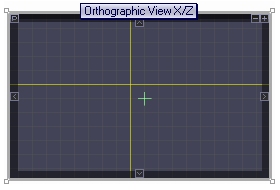
The Locator can be moved the following ways:
- Clicking the mouse button over either of the yellow lines and dragging it.
- Clicking the mouse over the intersection of the yellow lines to drag both of them.
- Opening the Locator window (short-cut Shift+L) and typing in the exact positions for the Locator.
The Locator is used for many purposes including:
- All functions within the Transformation Window can be applied relative to the Locator.
- When adding individual polygons (short-cut a) the vertexes assume the position of the Locator when an axis is not specified. For example, adding a polygon to the Orthogonal View X/Y window would allow use the X and Y positions where the cursor is but the Z position would be defined by the Locator.
- Objects created using the Geometry Window are positioned relative to the Locator.
- Special Points have their positioned defined at

Object Browser
Adding a Single Polygon
Transformation Window