
Contents
Polygon Properties (short-cut 'p')
After selecting a group of polygons, you can change their color and the direction they are facing using the Polygon Properties window (short-cut 'p').
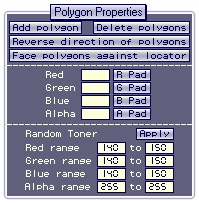
The four pad buttons (R Pad, G Pad, G Pad and A Pad) allow you to change the colors more sensitively. Hold the mouse button over one of the pads and moving the mouse up and down to adjust the color.
Any change can be undone by typing CTRL-Z.

Object Browser
Selecting Polygons and Vertexes